The
root.App.mainJSON blob this post originally parsed is no longer in Yahoo Finance’s page source, and a plainrequests.getnow returns HTTP 429 before it sees any HTML at all. The numbers are still in the page, spread across<fin-streamer>custom elements and a fewdata-testidspans, sorequestswith a browser User-Agent plus BeautifulSoup still gets them. For anything past a single page,yfinanceis the maintained route, and it hands back the same field names this post printed in 2021.
What the 2021 request returns now
Running the script at the bottom of this post against finance.yahoo.com/quote/GOOG today fails twice over, for two unrelated reasons.
The first failure arrives before any parsing. requests.get(url) with the library’s default User-Agent comes back as HTTP 429, Too Many Requests, with a 23-byte body. There is no HTML to hand BeautifulSoup. Setting a browser User-Agent header clears it and returns a normal 200 with about 1.3 MB of markup.
The second failure survives that fix. In those 1.3 MB, the string root.App.main appears zero times, and so does QuoteSummaryStore. There is no <script> tag holding a serialized store, so soup.find('script', ...) returns None and the regex has nothing to search. The page is rendered server-side into ordinary markup instead.
Where the numbers sit now
Yahoo puts live values in a custom element called fin-streamer. The GOOG page carries 96 of them, spanning 12 distinct data-field names, each holding a machine-readable copy of its value:
<span class="label" title="PE Ratio (TTM)"><span class="labelText">PE Ratio (TTM)</span></span>
<span class="value" title="16.39">
  <fin-streamer data-value="16.39" data-trend="none" active data-field="trailingPE">16.39 </fin-streamer>
</span>
The direct port of the 2021 idea is to ask for the first regularMarketPrice and call it the price. On the GOOG page that returns 7447.25, about twenty-two times what Alphabet was trading at. The number is real: it belongs to ES=F, the E-mini S&P 500 future in the market summary strip that runs along the top of every quote page. Twenty-eight elements on that page carry data-field="regularMarketPrice", and the ones in the strip are tagged with a data-symbol attribute naming the instrument. None of the twenty-eight is tagged GOOG. The stock’s own headline price sits outside that system entirely, in a plain span marked data-testid="qsp-price", while the statistics under the chart carry no data-symbol to filter on.
A selector that looks right returns a real number for the wrong instrument, and nothing in the output announces it. The field names collide among themselves as well. On the statistics list under the chart, both “PE Ratio (TTM)” and “EPS (TTM)” are tagged data-field="trailingPE", so asking for that field returns 16.39 and 20.29, two different statistics filed under one name. Ten of the sixteen statistics carry a fin-streamer at all; Bid, Ask, Beta and the dividend dates are plain markup with no data attribute to key on. The visible labels have none of these problems, which is the argument for reading those instead: “PE Ratio (TTM)” appears once, means one thing, and covers all sixteen rows.
Reading the quote page today
import requests
from bs4 import BeautifulSoup

UA = ("Mozilla/5.0 (Windows NT 10.0; Win64; x64) AppleWebKit/537.36 "
      "(KHTML, like Gecko) Chrome/126.0.0.0 Safari/537.36")

html = requests.get(
    "https://finance.yahoo.com/quote/GOOG/",
    headers={"User-Agent": UA},
    timeout=30,
).text
soup = BeautifulSoup(html, "html.parser")

price = soup.select_one('[data-testid="qsp-price"]').get_text(strip=True)

stats = {}
for li in soup.select('[data-testid="quote-statistics"] li'):
    label, value = li.select_one(".label"), li.select_one(".value")
    if label and value:
        stats[label.get_text(strip=True)] = value.get_text(strip=True)
That gives a price and sixteen labelled statistics. A run on 2026-07-29, after the 28 July close:
price = '332.60'

{'Previous Close': '326.57', 'Open': '327.80',
 'Bid': '332.62 x 100', 'Ask': '333.86 x 100',
 "Day's Range": '324.54 - 335.21', '52 Week Range': '188.70 - 404.47',
 'Volume': '20,880,881', 'Avg. Volume': '22,603,369',
 'Market Cap (intraday)': '4.068T', 'Beta (5Y Monthly)': '1.25',
 'PE Ratio (TTM)': '16.39', 'EPS (TTM)': '20.29',
 'Earnings Date (est.)': 'Oct 28, 2026',
 'Forward Dividend & Yield': '0.88 (0.27%)',
 'Ex-Dividend Date': 'Sep 4, 2026', '1y Target Est': '421.79'}
The values arrive as display strings, commas, suffixes and all, so 4.068T and 20,880,881 need parsing before arithmetic. The CSS class names in the markup are build-generated hashes like yf-1pza0az and are not worth selecting on. data-testid attributes are steadier, though neither they nor the label wording are anything Yahoo has promised to keep.
The yfinance route
For more than one page, the library does the work. yfinance is on 1.5.2 and still under active development: 1.5.1 alone lists “Replace valuation-measures HTML scrape with timeseries API,” the same kind of move this post describes, handled inside the library.
import yfinance as yf

t = yf.Ticker("GOOG")
t.fast_info["lastPrice"]      # 332.6000061035156
t.info["trailingPE"]          # 16.392311
t.info["totalRevenue"]        # 445865984000
t.history(period="5d")        # DataFrame: Open/High/Low/Close/Volume
The 2021 script below printed a financialData dictionary with thirty keys in it: currentPrice, trailingPE, totalRevenue, freeCashflow, recommendationKey, and the rest. Every one of those thirty names is present in Ticker.info today. The route into the data changed completely and the vocabulary did not move at all, so that old output still reads as a usable field reference.
fast_info skips the full metadata fetch when price and market cap are all that is needed.
Rate limits and terms
Yahoo’s robots.txt lists User-agent: Scrapy in a long block of agents disallowed from the entire site, alongside the AI crawlers. Scraping frameworks are named there by default, though /quote/ itself is not disallowed for a general agent. On the data itself, the yfinance README is direct: the project is “not affiliated, endorsed, or vetted by Yahoo, Inc.”, it points at Yahoo’s terms of use for what you may do with what you download, and it says the API “is intended for personal use only”.
The 2021 approach
Kept here as the record. This is what the page served then: a single <script> tag with the whole page state serialized into it, which you could pull out with one regex.
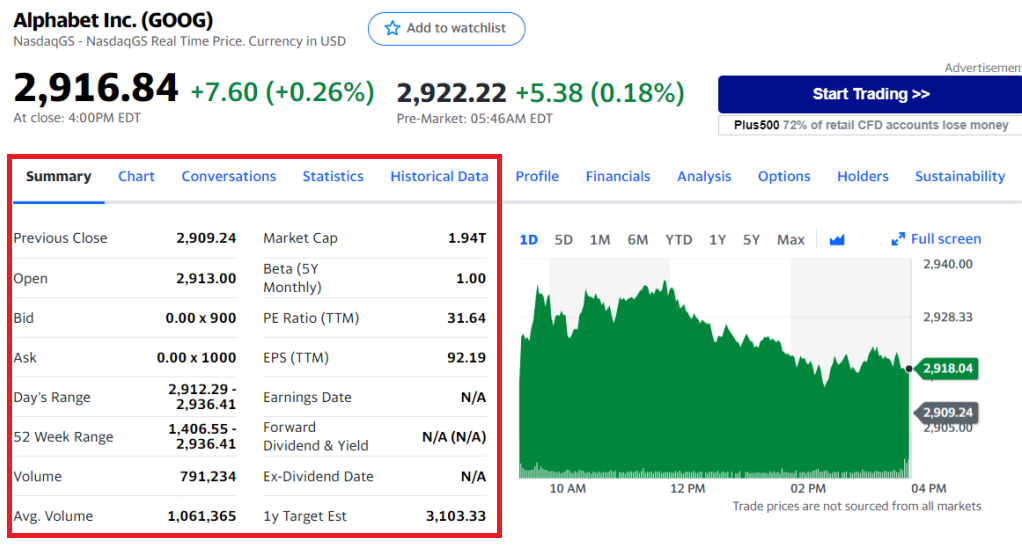
The page being scraped.
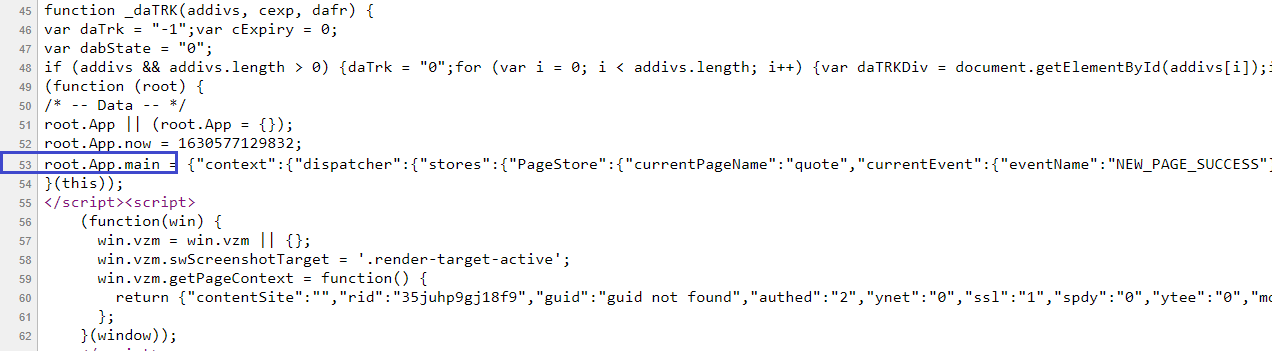
View page source, script, root.App.main.
from bs4 import BeautifulSoup
import re
import json
import requests

response = requests.get("https://finance.yahoo.com/quote/GOOG?p=GOOG&.tsrc=fin-srch")
soup = BeautifulSoup(response.text, "html.parser")
script = soup.find('script', text=re.compile('root.App.main')).text
data = json.loads(re.search("root.App.main\\s+=\\s+({.*})", script).group(1))
stores = data["context"]["dispatcher"]["stores"]
print(stores)
stores held every panel on the page at once, keyed by name, and the financial figures came out of one of them:
financial_data = stores["QuoteSummaryStore"]["financialData"]
pprint.pprint(financial_data)
{'currentPrice': {'fmt': '2,913.75', 'raw': 2913.75},
 'currentRatio': {'fmt': '3.15', 'raw': 3.152},
 'debtToEquity': {'fmt': '11.83', 'raw': 11.829},
 'earningsGrowth': {'fmt': '169.10%', 'raw': 1.691},
 'ebitda': {'fmt': '75.55B', 'longFmt': '75,552,997,376', 'raw': 75552997376},
 'ebitdaMargins': {'fmt': '34.30%', 'raw': 0.34300998},
 'financialCurrency': 'USD',
 'freeCashflow': {'fmt': '44.61B',
                  'longFmt': '44,609,626,112',
                  'raw': 44609626112},
 'grossMargins': {'fmt': '55.72%', 'raw': 0.55723},
 'grossProfits': {'fmt': '97.8B',
                  'longFmt': '97,795,000,000',
                  'raw': 97795000000},
 'maxAge': 86400,
 'numberOfAnalystOpinions': {'fmt': '9', 'longFmt': '9', 'raw': 9},
 'operatingCashflow': {'fmt': '80.86B',
                       'longFmt': '80,858,996,736',
                       'raw': 80858996736},
 'operatingMargins': {'fmt': '28.45%', 'raw': 0.28448},
 'profitMargins': {'fmt': '28.57%', 'raw': 0.2857},
 'quickRatio': {'fmt': '3.03', 'raw': 3.027},
 'recommendationKey': 'buy',
 'recommendationMean': {'fmt': '1.60', 'raw': 1.6},
 'returnOnAssets': {'fmt': '12.76%', 'raw': 0.12759},
 'returnOnEquity': {'fmt': '28.29%', 'raw': 0.2829},
 'revenueGrowth': {'fmt': '61.60%', 'raw': 0.616},
 'revenuePerShare': {'fmt': '326.66', 'raw': 326.656},
 'targetHighPrice': {'fmt': '3,400.00', 'raw': 3400},
 'targetLowPrice': {'fmt': '2,700.00', 'raw': 2700},
 'targetMeanPrice': {'fmt': '3,103.33', 'raw': 3103.33},
 'targetMedianPrice': {'fmt': '3,100.00', 'raw': 3100},
 'totalCash': {'fmt': '135.86B',
               'longFmt': '135,863,001,088',
               'raw': 135863001088},
 'totalCashPerShare': {'fmt': '203.77', 'raw': 203.768},
 'totalDebt': {'fmt': '28.1B', 'longFmt': '28,100,999,168', 'raw': 28100999168},
 'totalRevenue': {'fmt': '220.27B',
                  'longFmt': '220,265,005,056',
                  'raw': 220265005056}}
Each figure came with both a raw number and a preformatted fmt string, which is the one convenience the current markup does not offer.
What to use
For one symbol and a handful of headline numbers, requests with a browser User-Agent and label-keyed BeautifulSoup selectors is enough, and it stays small. Past that, yfinance absorbs the parts that keep changing: cookies, rate limits, and whichever endpoint Yahoo happens to be serving this quarter. Either way the markup is not a contract, and the useful habit is to assert that a parsed number is in a sane range before it reaches anything that trades on it.
Checked 2026-07-29 against finance.yahoo.com/quote/GOOG with requests 2.32.5, beautifulsoup4 4.14.3 and yfinance 1.5.2; prices are from the 28 July close. Yahoo moves this page without notice, so if you find it has changed again, tell me and I’ll update.
Sources
- yfinance, README and CHANGELOG
- Yahoo Finance, robots.txt