Python Chunks

Python Chunks

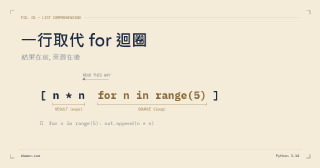
當我們要把list分成好幾個chunk時的幾種做法 yield def chunks1(input_list, n): for i in range(0, len(input_list), n): yield input_list[i:i + n] input_list = [i for i in range(0, 15)] print(list(chunks1(input_list, 4))) ## [[0, 1, 2, 3], [4, 5, 6, 7], [8, 9, 10, 11], [12, 13, 14]] 一行for迴圈 input_list = [i for i in range(0, 15)] n = 3 output_list = [input_list[i:i+ n] for i in range(0, len(input_list), n)] print(output_list) ## [[0, 1, 2], [3, 4, 5], [6, 7, 8], [9, 10, 11], [12, 13, 14]] iterable 針對任何iterable from itertools import islice def chunks2(input_iter, n): input_list = iter(input_iter) return iter(lambda: tuple(islice(input_list, n)), ()) input_list = [i for i in range(0, 15)] n = 4 print(list(chunks2(input_list, n))) ## [(0, 1, 2, 3), (4, 5, 6, 7), (8, 9, 10, 11), (12, 13, 14)] Numpy import numpy as np input_list = [i for i in range(0, 15)] np.array_split(input_list, 5) ## [array([0, 1, 2]), ## array([3, 4, 5]), ## array([6, 7, 8]), ## array([ 9, 10, 11]), ## array([12, 13, 14])] 上述幾種簡單的方式皆可達成 ...

2021-11-26 · 1 min read · 168 words · KbWen · ZH
Python Comments

Python Comments

開發時加入註釋有助於描述思考過程,並幫助自己和其他人了解意圖,可以更輕鬆地發現錯誤、改進程式,以及在其他地方做更多應用。 單行註釋 加入註釋以 # 開頭, # defining the start code startCode = 50 也可加在程式碼後方,會被忽略, startCode = 50 # defining the start code 注意不要加入無用的描述, 如同變數命名時不要取沒意義的名稱。 多行註釋 當要註釋的內容很多,或是撰寫文件、功能之類的,可以使用這種方式。 PEP8中建議單行不要超過79個字,一般情況則是會照公司或是團隊的開發習慣決定。 多行#開頭, # PythonComments version 1.0.3 # -a (--all): show all features # -h (--help): show the help # ..... 或是用""" 包住 """ PythonComments version 1.0.3 -a (--all): show all features -h (--help): show the help ..... """ 系列文章 Python pdb Python Iterable Python Context Manager Python Lambda Python f-string

2020-05-04 · 1 min read · 76 words · KbWen · ZH
Python f-string

Python f-string

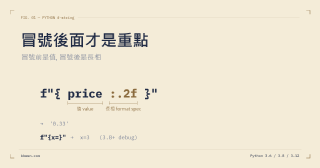
python 3.6後,字串多了個處理方法 PEP 498 – Literal String Interpolation 下面直接用例子來比較f-string和我們之前常用的 %-formatting、str.format()語法不同之處 >>> # %-formatting ... >>> text = "Hello" >>> number1 = 10 >>> number2 = 20 >>> print("%s, test numbers are %s and %s" % (text, number1, number2)) Hello, test numbers are 10 and 20 >>> # str.format() ... >>> text = "Hello" >>> number1 = 10 >>> number2 = 20 >>> print("{}, test numbers are {} and {}".format(text, number1, number2)) Hello, test numbers are 10 and 20 >>> print("{0}, test numbers are {2} and {1}".format(text, number1, number2)) Hello, test numbers are 20 and 10 >>> # f-string ... >>> text = "Hello" >>> number1 = 10 >>> number2 = 20 >>> print(f"{text}, test numbers are {number1} and {number2}") Hello, test numbers are 10 and 20 F-string 看起來更python了,也解決了之前會遇到的問題;例如使用 %時的參數限制等等。 在變數變多的情況下更易讀也易改。 嘗試做更多操作 >>> f"{3 + 8}" '11' >>> text = "Literal String Interpolation" >>> f"{text.upper()}" 'LITERAL STRING INTERPOLATION' >>> f"{1/3:.2f}" '0.33' 也可以放入lambda表達式。 ...

2020-04-24 · 1 min read · 164 words · KbWen · ZH
Python lambda

Python lambda

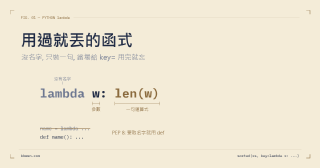
lambda function(匿名函式) 基本語法 lambda arg1, arg2,... : expression fun = lambda x: x + 1 print(fun(5)) >>> 6 lambda function可以看做是一個簡單的function, 有好幾個輸入,但是只能有一個運算式。 適合的使用時機 有幾個時機適合使用lambda function 無法重複使用:“don’t repeat yourself”,因此若知道這個功能簡單且不會在類似的地方重複使用,那這是個好時機。 不想去想變數名稱:在實作功能時,會希望變數名稱就能知道這個東西可能會是甚麼,而不是只有x,y,i,j等等看不出意義或是會搞混的名稱;要注意情況,大多還是乖乖想名字吧。 系列文章 Python pdb Python Iterable Python Context Manager Python f-string Python Comments

2020-04-23 · 1 min read · 40 words · KbWen · ZH
Python context manager

Python context manager

內文管理器 python with 語句,能讓我們更輕易的實行資源管理,例如數據、開啟文件,或是各種會lock的行為。 要保證處理完相關事情,資源有被釋放。 簡單行為中,我們會這樣去開啟文件 test_file = open('test.txt', 'w') try: test_file.write('line one') finally: test_file.close() 上述行為除了是非慣用以外, 若try-finally裡面邏輯複雜,還面臨著維護的困難。 這裡有著使用 with 的簡單用法 with open('test.txt', 'w') as test_file: test_file.write('line one') 上述程式碼中,當 with 內的語句執行結束後,會自動關閉該資源,且變數test_file也會結束。 實現context manager 若想實現 context manager的功能,則要定義好__enter__ 與 __exit__ 兩個函式,分別管理with的進入行為和結束行為。 系列文章 Python pdb Python Iterable Python Lambda Python f-string Python Comments

2020-04-14 · 1 min read · 49 words · KbWen · ZH
Python Iterable

Python Iterable

要了解python 哪些對象是可以迭代的, 可以先了解兩個相似的名詞 Iterable Iterator Iterable 可以被迭代、遍歷(loop, iteration)的物件對象可以被稱為iterable, 從官方文件得知,要實現__iter__或是__getitem__的方法即可。 包含了常見的list、tuple、set、dict、str、range, >>> dir(str()) ['__add__', '__class__', '__contains__', '__delattr__', '__dir__', '__doc__', '__eq__', '__format__', '__ge__', '__getattribute__', '__getitem__', '__getnewargs__', '__gt__', '__hash__', '__init__', '__init_subclass__', '__iter__', ......] 但若是使用collection去檢查是否是iterable 只有實現__getitem__的對象可以被迭代但不會是iterable Iterator https://docs.python.org/3.7/c-api/iter.html 從官方文件看出,含有__iter__和__next__的對象可稱為iterator, iterator是iterable的子集合, 上述提到的幾種方式是iterable但都不是iterator,可以使用上面用到的isinstance或是dir來確認, >>> from collections.abc import Iterable, Iterator >>> for i in ([1,2,3], "123", (1,2,3)): ... print(f"{i} is iterable: {isinstance(i, Iterable)}") ... print(f"{i} is iterator: {isinstance(i, Iterator)}") ... [1, 2, 3] is iterable: True [1, 2, 3] is iterator: False 123 is iterable: True 123 is iterator: False (1, 2, 3) is iterable: True (1, 2, 3) is iterator: False 而文件則是iterator >>> file_path = os.path.abspath("test.py") >>> with open(file_path) as ifile: ... isinstance(ifile, Iterator) ... True 結語 了解了iterable和iterator,以後開發時, 若想創造出可以被迭代的對象或是迭代器, 則要知道必須要包含哪些基礎功能 那麼Generator呢? 系列文章 Python pdb Python Context Manager Python Lambda Python f-string Python Comments

2020-04-11 · 1 min read · 127 words · KbWen · ZH
python pdb

python pdb

pdb — The Python Debugger 一段簡單的程式碼 print(f'file = {__file__}') 常見pdb幾種使用方式 1. 直接使用 python -m pdb file.py 執行上面指令會讓整個檔案進入pdb模式操作 > /home/src/test.py(1)<module>() -> file = __file__ (Pdb) 2. 設斷點 把上面程式碼改成 file = __file__ import pdb; pdb.set_trace() print(f'file = {file}') 執行後則會在第二行進入pdb > /home/src/test.py(3)<module>() -> print(f'file = {file}') (Pdb) 結果如同上方,此時進入操作。 在python3.7之後版本,可以使用 breakpoint() 指令 詳見pep553 file = __file__ breakpoint() print(f'file = {file}') 3. python shell 中使用 如果使用中遇到一些function的錯誤,可以這樣使用 創造一個測試function: def test(): a = 1 b = 'b' return a + b 這個function會出現錯誤:數字和字串的操作 再進入python >>> from test import test >>> import pdb >>> test() Traceback (most recent call last): File "<stdin>", line 1, in <module> File "/home/src/test.py", line 4, in test return a + b TypeError: unsupported operand type(s) for +: 'int' and 'str' >>> pdb.pm() > /home/src/test.py(4)test() -> return a + b (Pdb) 一樣也會進入pdb操作 ...

2020-04-10 · 1 min read · 145 words · KbWen · ZH
Python reminder

Python reminder

變數 不用宣告變數的型態 可以直接用 x, y = y, x 對調 同時宣告多個變數的方法: 上下兩類方法會得到兩種結果 (前者數字,後者字串);注意變數數量和迭代的數量要相同。 String 表示 Escape \ Python 中 \ 代表著脫離字串,常見如下: 要讓「脫離字串」回到字串型式,前面要再加 \;例如倒數第二個用 Raw string 也是相同意思:r'****'。 字串可以迭代。 字串也有像基本 list 的取值、讀值方式;代表可以使用非物件專屬的函式,例如:len()。 範例,可以注意 find 指令的回傳值: ‘’.format() 與 %s 這兩種輸出方式會得到類似的結果: 目前看到在 tuple 下,% 會有問題,我想我會多習慣用 ''.format() 格式。

2017-04-14 · 1 min read · 42 words · KbWen · ZH