TL;DR: A prompt and a skill can hold the exact same words. What differs is the machinery around them. A prompt is text you drop into the model’s context yourself, for one task. A skill is a file the model loads on its own, only when your request matches its one-line
description— Anthropic’s docs describe skills that “load on-demand” against prompts they call “conversation-level instructions for one-off tasks.” That on-demand loading (the docs call it progressive disclosure: a ~100-token summary stays resident, the full body is read only when needed) is what lets a skill carry things a prompt can’t: declared inputs, named tools, and a scope it promises not to exceed.
Most of a skill file is instructions in plain language, the same kind of thing you’d type into a chat box. You could copy the body, paste it as a prompt, and the model would do roughly the same work, once.
So the words aren’t where the difference lives. A skill that was only its text would be a prompt with a filename. What makes it something else is the file it sits in, and the fact that something other than you decides when to read it.
The one line a prompt doesn’t have
Here’s a real one, from the small set of skills Anthropic ships for handling documents. The part that makes it a skill rather than a note to self is two lines of YAML at the top:
name: pdf-processing
description: Extract text and tables from PDF files, fill forms, merge documents. Use when working with PDF files or when the user mentions PDFs, forms, or document extraction.
The name is how you’d call it by hand. The description is the line with no counterpart in a prompt. It does two jobs: it says what the skill does, and it says when to use it (“Use when working with PDF files…”). Anthropic’s authoring guidance is explicit that a description should carry both — what the skill does and when the model should reach for it.
That second job is the interesting one. “When to use it” is not an instruction the model follows while doing the task. It’s a rule the runtime reads before the task, to decide whether this file is relevant right now. A prompt never needs that line, because a prompt is already in context the moment you send it. You did the choosing. A skill has to be chosen, and the description is how something else makes the choice.
Who reads it, and when
The something else is the model, and the mechanism has a name: progressive disclosure. Anthropic’s Agent Skills docs describe it as loading information “in stages as needed, rather than consuming context upfront.”
The stages are the useful detail. When an agent starts up, it loads only the name and description of every skill available to it (the docs estimate that at roughly 100 tokens per skill) and nothing more. At that point, in the docs’ words, “until a Skill is triggered, only its name and description occupy context.” The bodies stay on disk. When a request comes in that matches one of those descriptions, and only then, the agent reads that skill’s full file into context.
| What loads | When it loads | Token cost |
|---|---|---|
name + description |
always, at startup | ~100 per skill |
the SKILL.md body |
when a request matches the description | under 5k |
| bundled reference files | only if the body points to them | none until read |
This tiering is why you can have fifty skills installed and pay, most of the time, for fifty short descriptions rather than fifty full bodies. A prompt has no tiers. It’s resident in full the whole time it’s in the conversation, because putting it there was the only way to use it. The loading difference is real, and it mostly buys you a cleaner context and a smaller bill. It isn’t yet the thing that changes what you can build.
Edges are what you’re actually buying
Here’s the part that earns the word “building.” Once a capability is addressable, with a name and a body the model pulls in on demand, you can specify it instead of only describing it.
Think about what you’d tell a model in a prompt to keep it in bounds: something like “you’re a careful engineer, please don’t touch anything outside the module I named.” A skill can carry that intent as structure rather than hope. It can declare its inputs (the files in scope), its output (the changed files, plus a list of what changed), the specific tools it’s allowed to reach for, and a scope it states it will not cross. That declared boundary is where the predictability comes from: a skill behaves predictably to about the degree its edge is drawn, the way a well-specified API does.
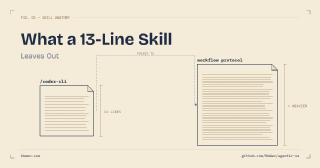
The payoff shows up when the model slips. A prompt that says “be careful” has spent everything it has the moment it’s sent; if the model isn’t careful on some run, you learn that afterward, from the damage. A skill can hold a step that runs no matter how the model felt: after the tool returns, read the diff, and undo anything outside the agreed scope. I had a model draft a skill exactly like that once, a thirteen-line file pointing at a longer checklist, and the checklist, not the thirteen lines, is where the real work sat. You can’t paste that kind of enforceable check into a chat box and trust it. It’s a property of having built the thing as a bounded unit instead of a paragraph of good intentions.
This is the shift the whole “skill versus prompt” question is circling. Once you’re declaring inputs and scopes and fallbacks, and depending on the result being reusable, testable, versionable, and swappable underneath its callers, you’re doing software design. Those are software concerns, and the effort that used to go into getting a model to say the right thing now goes into building a component you can rely on.
Where it stops being automatic
None of this runs itself, and two gaps are worth knowing before you lean on it.
The first is the trigger. A skill only loads when the model judges that a request matches its description, so a vague or misleading description is a skill that quietly never fires, or fires on the wrong task. That one line is load-bearing and easy to write badly. The misses are silent: a skill that should have fired and didn’t leaves no trace unless you go looking.
The second is fidelity to the real world. A model is genuinely good at the shape of a skill: the dispatcher, the fallback clause, a plausible set of command-line flags for whatever tool it’s wrapping. It is not reliable about whether those flags exist. In the case above, several of the flags the model wrote confidently weren’t real ones. They were what such a tool ought to expose, extrapolated from thousands of similar tools, not what this one actually did. Only running the tool with --help told the invented surface from the real one.
So a skill moves the judgment somewhere new. Less effort goes into coaxing the model line by line, and more into drawing the boundary and checking the output against something real.
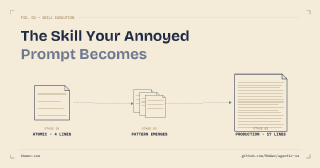
The smallest real skill is barely more than a prompt: the same instructions, plus a description so the model can find it and a boundary it can’t step past. Most people write their first one by accident, the day a prompt they’d retyped too many times finally gets saved to a file. From there, the description and the boundary carry the load a prompt never could: deciding when the thing runs, and what it’s allowed to touch once it does.
This post is the entry point to a short series on building with skills:
- Skill Design as Interface Design — treating a skill as a contract: declared inputs, outputs, and a scope it won’t exceed
- What a 13-Line Skill Leaves Out — one real skill taken apart, and the part the model got confidently wrong
- The Skill Your Annoyed Prompt Becomes — how to write your first one, starting from a prompt you’ve typed three times